


Selenium mobile testing is often misunderstood as a standalone mobile automation tool. In reality, Selenium acts as the browser automation layer within a larger mobile testing ecosystem that includes Appium, devices, and CI/CD pipelines.
Mobile usage has grown dramatically over the past decade. According to data published by Statista, mobile devices generate more than half of global web traffic. That means mobile functionality, performance, and user experience are now critical to business success.
Selenium mobile testing refers to using Selenium to automate mobile browser interactions, often combined with tools like Appium to interact with mobile devices.
Understanding how this ecosystem works is essential for building reliable automation systems.
Table of Contents
What Is Selenium Mobile Testing?
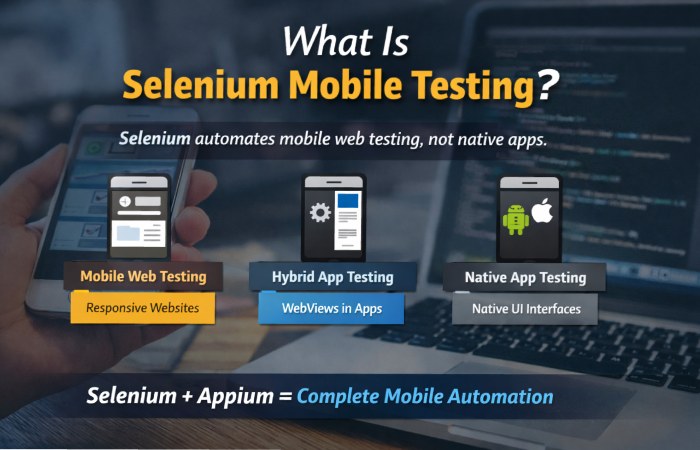
Selenium is an open-source framework originally designed to automate web browsers. When applied to mobile environments, Selenium enables testers to simulate user interactions with mobile websites.
This includes tasks such as:
- clicking buttons
- filling forms
- navigating pages
- validating UI behavior
However, Selenium alone cannot interact with native mobile interfaces.
Why Mobile Test Automation Matters
Mobile-first design has become the standard for modern web and application development. Businesses depend on mobile performance to deliver user experiences that convert visitors into customers.
The Mobile Testing Challenge
Testing mobile apps involves multiple layers of complexity. A feature that works perfectly on one phone may fail on another due to differences in:
- browser engines
- operating systems
- hardware capabilities
Manual testing often becomes inefficient when QA teams need to test across dozens of devices.
Automation as the Solution
Automation frameworks allow developers and QA engineers to run consistent tests across multiple devices. Selenium is widely adopted for this purpose because it offers:
- strong browser automation capabilities
- multi-language support
- integration with development pipelines
Key Challenges in Mobile Testing
| Challenge | Impact on Testing |
| Device fragmentation | Thousands of device variations |
| Browser differences | Chrome, Safari, Samsung Internet behave differently |
| Screen sizes | UI elements may break on smaller displays |
| Network conditions | Mobile connections introduce latency |
| OS updates | Platform changes can break functionality |
Automation helps teams detect these issues earlier in development.
Types of Mobile Testing Supported by Selenium
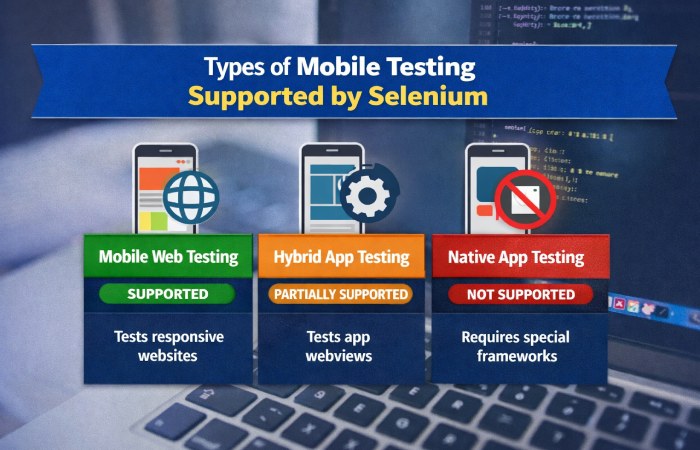
| Mobile Testing Type | Selenium Support | Description |
| Mobile web testing | Yes | Tests responsive websites |
| Hybrid app testing | Partial | Tests webviews inside apps |
| Native app testing | No | Requires specialized frameworks |
Understanding these categories is essential before implementing automation.
Can Selenium Test Mobile Apps?
The answer depends entirely on the type of application.
Many beginners assume Selenium can automate any mobile interface. In reality, its capabilities are limited to browser environments unless combined with other tools.
Mobile Application Types and Testing Tools
| Application Type | Recommended Tool | Reason |
| Mobile websites | Selenium | Direct browser automation |
| Hybrid applications | Selenium + Appium | Webview automation |
| Native Android apps | Espresso | Designed for Android UI |
| Native iOS apps | XCUITest | Apple-native automation |
Hybrid applications are particularly interesting because they mix native and web technologies.
How Selenium Mobile Testing Works
Mobile automation requires multiple components working together. Selenium functions as one layer within a larger automation architecture.
Typical Mobile Automation Architecture
| Layer | Technology | Role |
| Test script | Java, Python, JavaScript | Defines testing logic |
| Automation engine | Selenium WebDriver | Executes browser commands |
| Mobile bridge | Appium | Connects Selenium to devices |
| Device environment | Android / iOS devices | Executes the tests |
Tools Required for Selenium Mobile Testing
Mobile automation environments typically require several tools and dependencies.
Core Tools in a Mobile Testing Stack
| Tool | Purpose | Importance |
| Selenium WebDriver | Browser automation API | Core automation engine |
| Appium | Mobile automation framework | Device communication |
| Android SDK | Android testing environment | Device configuration |
| Xcode | iOS development tools | Required for iOS automation |
Additional infrastructure tools are often used for scaling tests.
CI/CD and Infrastructure Tools
| Tool | Function |
| Jenkins | Continuous integration automation |
| Docker | Containerized test environments |
| GitHub Actions | Automated workflows |
These tools enable automated testing during every code update.
Selenium Mobile Testing Setup
Setting up a mobile automation environment requires several steps.
Although tutorials sometimes simplify the process, real-world environments involve multiple dependencies.
Basic Environment Setup Checklist
| Step | Description |
| Install programming language runtime | Java or Python |
| Install Selenium libraries | WebDriver packages |
| Install Appium server | Mobile automation bridge |
| Configure Android SDK | Device management |
| Connect emulator or real device | Test execution environment |
QA teams often automate these setups using containerization.
Supported Platforms and Browsers
Mobile browser automation varies depending on platform compatibility.
Android Browser Automation
| Browser | Support Level | Notes |
| Chrome | Full | Most widely used |
| Firefox | Moderate | Limited automation features |
| Samsung Internet | Partial | Requires additional configuration |
iOS Browser Automation
| Browser | Support Level | Notes |
| Safari | Full | Primary automation browser |
| Chrome | Limited | Uses Safari WebKit engine |
Apple’s platform restrictions require all browsers to use the same underlying rendering engine.
Advantages of Selenium Mobile Testing
Selenium remains popular because it offers several benefits for development teams.
Key Benefits
| Advantage | Explanation |
| Open-source | No licensing costs |
| Cross-language support | Works with Java, Python, JS |
| Strong ecosystem | Large community and documentation |
| CI/CD compatibility | Easy integration into pipelines |
These advantages make Selenium one of the most widely adopted testing frameworks worldwide.
Limitations and Challenges
Despite its strengths, Selenium mobile testing has several limitations.
Common Limitations
| Limitation | Practical Impact |
| No native automation | Requires Appium integration |
| Device fragmentation | Hard to achieve full coverage |
| Setup complexity | Multiple dependencies |
| Test instability | Network or device issues |
Automation scripts can also fail due to timing issues or dynamic UI elements.
Best Practices for Selenium Mobile Automation
Successful mobile automation requires thoughtful design and strategy.
Recommended Testing Practices
| Practice | Benefit |
| Page Object Model | Improves test maintainability |
| Real device testing | More accurate user simulation |
| Parallel test execution | Faster test cycles |
| Cloud device testing | Wider device coverage |
Popular Cloud Device Platforms
| Platform | Purpose |
| BrowserStack | Real device cloud testing |
| Sauce Labs | Scalable test infrastructure |
| LambdaTest | Cross-device automation |
Cloud platforms reduce the need to maintain physical devices in-house.
Real-World Mobile Automation Workflow
Modern QA teams integrate automation directly into development pipelines.
Example CI/CD Automation Pipeline
| Stage | Process |
| Code commit | Developer pushes changes |
| Build stage | Application compiled |
| Test stage | Selenium mobile tests executed |
| Reporting | Results shared with QA |
| Bug fixing | Developers resolve issues |
Automation servers like Jenkins often manage these pipelines.
Selenium vs Other Mobile Testing Tools
Different tools serve different purposes within the mobile testing ecosystem.
Comparison of Mobile Automation Tools
| Tool | Best Use Case | Platform |
| Selenium | Mobile web automation | Cross-platform |
| Appium | Hybrid and cross-platform apps | Android / iOS |
| Espresso | Native Android apps | Android |
| XCUITest | Native iOS apps | iOS |
Choosing the right tool depends on the architecture of the application being tested.
Future of Mobile Test Automation
Mobile testing technologies continue to evolve as development practices change.
Industry research from organizations such as Gartner highlights several emerging trends in automation.
Emerging Trends
| Trend | Impact |
| AI-generated tests | Faster script creation |
| Self-healing automation | Reduced maintenance |
| Cloud testing platforms | Massive device coverage |
| Low-code testing tools | Easier automation adoption |
These trends aim to reduce the complexity and maintenance costs associated with traditional automation frameworks.
Conclusion
Selenium mobile testing plays an important role in modern software quality assurance, but it must be understood in the correct context.
Selenium is not a complete mobile testing solution. Instead, it acts as the browser automation engine within a broader testing ecosystem that includes frameworks like Appium, device infrastructure, and CI/CD pipelines.
When used correctly, Selenium enables teams to automate mobile web experiences, detect bugs earlier, and deliver more reliable software.
Understanding this architecture helps QA teams design automation strategies that scale with the complexity of modern mobile ecosystems.