
The best Chromebook to buy in 2026 isn’t about brand rankings—it’s about aligning performance tier, workload intensity, and update lifespan so you avoid overspending or underspec’ing.
If you want a direct answer: most people should buy a Chromebook Plus model with at least 8GB RAM and long update support. Budget models are fine only for light tasks, while premium devices mainly improve build quality—not everyday speed.
Table of Contents
Top Chromebooks To Buy Right Now
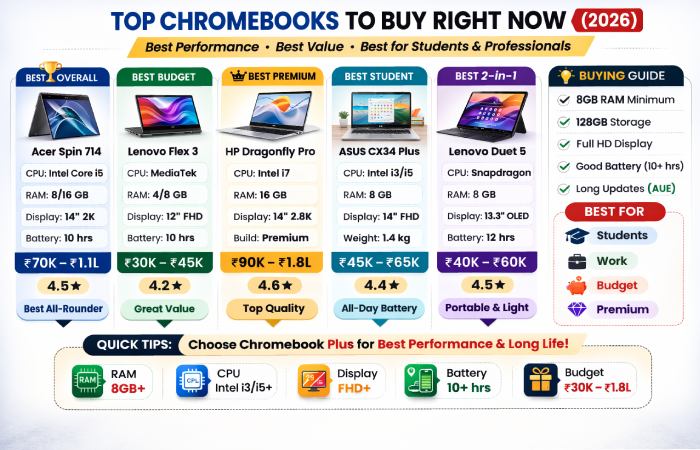
Best Overall: Acer Chromebook Plus Spin 714
This is the safest “buy once, use for years” Chromebook.
Why it stands out
| Feature | Real-World Benefit |
| Intel Core-class CPU | Smooth multitasking |
| 8–16GB RAM | Handles heavy browsing + apps |
| 2-in-1 hinge | Laptop + tablet modes |
| Premium build | Durable for travel/work |
Typical India price: ₹70,000–₹1,10,000 (imported stock varies)
Average reviews: ~4.3–4.6 ★
Best Budget: Lenovo IdeaPad Flex 3 Chromebook
Affordable and reliable for basic needs.
| Good For | Not Ideal For |
| Schoolwork | Heavy multitasking |
| Streaming | Many tabs |
| Email & browsing | Android/Linux apps |
Typical India price: ₹30,000–₹45,000
Best Premium: HP Dragonfly Pro Chromebook
Luxury Chromebook experience with elite hardware.
| Premium Feature | Why It Matters |
| Ultra-bright display | Outdoor usability |
| Excellent speakers | Media + meetings |
| High-end keyboard | Long typing sessions |
| Premium materials | Travel durability |
Typical India price: ₹90,000–₹1,80,000 (limited availability)
Best Student Pick: ASUS Chromebook Plus CX34
Balanced price, performance, and portability.
| Student Needs | CX34 Performance |
| Research tabs | Smooth |
| Online classes | Reliable |
| Battery life | All-day |
| Portability | Lightweight |
Typical India price: ₹45,000–₹65,000
Best Detachable / Tablet Style: Lenovo Chromebook Duet 5
Ideal for travel, note-taking, and media.
| Strength | Limitation |
| OLED display | Moderate performance |
| Very light | Not for heavy workloads |
| Long battery | ARM chip limits |
Typical India price: ₹40,000–₹60,000
The Regret-Free Chromebook Framework
Step 1 — Identify Your Workload
| Workload Level | Typical Use | Recommended Specs |
| Light | Email, YouTube, Docs | 4–8GB RAM |
| Moderate | 20+ tabs, Zoom | 8GB RAM |
| Heavy | Linux, dev tools | 16GB RAM |
Example: A remote worker using Slack, Docs, Gmail, Meet, and research tabs = Moderate to Heavy.
Step 2 — Choose Performance Tier
| Tier | Who Should Buy | Risk if Too Low |
| Entry | Kids/basic users | Lag |
| Mid-range | Students/home | Occasional slowdowns |
| Chromebook Plus | Most adults | Safe |
| Premium | Power users | Higher cost |
The Chromebook Plus program from Google sets minimum standards for speed, memory, and display quality.
Step 3 — Check Update Lifespan (AUE)
ChromeOS devices receive updates for years, but not forever.
| Why AUE Matters | Impact |
| Security | Device stays safe |
| Compatibility | Apps continue working |
| Resale value | Higher |
| Long-term cost | Lower |
Organizations such as Consumer Reports emphasize longevity and usability over raw specs.
Chromebook Plus vs Standard
| Feature | Standard | Plus |
| RAM | Often 4GB | 8GB+ |
| CPU | Entry | Modern |
| Multitasking | Limited | Smooth |
| Longevity | Moderate | Strong |
| Display | Basic | Full HD+ |
In 2026, Plus models feel like mainstream laptops, not “budget web machines.”
Real-World Buying Scenarios
College Student (~₹50K Budget)
Best strategy: Discounted Plus model.
Why:
| Requirement | Reason |
| Many tabs | Research-heavy tasks |
| Video classes | Needs stable performance |
| Multi-year use | Durability matters |
Remote Worker
Best choice: 8–16GB RAM Chromebook Plus.
Failure pattern:
- Budget device slows during meetings
- Multitasking becomes frustrating
- Productivity drops
Parent Buying for School
Focus on reliability over power.
| Priority | Why |
| Battery life | Full school day |
| Simplicity | Low maintenance |
| Durability | Backpack use |
| Price | Replacement risk |
Who Should NOT Buy a Chromebook
Chromebooks excel at web-centric work, but not everything.
Not suitable for:
| Use Case | Better Alternative |
| AAA gaming | Windows gaming laptop |
| Professional video editing | Mac/Windows workstation |
| Engineering software | Windows PC |
| Offline enterprise tasks | Traditional laptop |
Top Chromebooks — Pricing, Reviews & Where to Buy (India & Global)
| Model | India Price | Reviews | Where to Buy in India | Global Availability |
| Acer Spin 714 | ₹70K–₹1.1L | ~4.5★ | Amazon, Flipkart, import stores | US, UK, EU |
| Lenovo Flex 3 | ₹30K–₹45K | ~4.2★ | Amazon, Flipkart | Global |
| HP Dragonfly Pro | ₹90K+ | ~4.6★ | Import retailers | US, EU |
| ASUS CX34 Plus | ₹45K–₹65K | ~4.4★ | Amazon, ASUS stores | Global |
| Lenovo Duet 5 | ₹40K–₹60K | ~4.5★ | Amazon, Flipkart | Global |
Where to Buy Chromebooks in India
Major Online Retailers
- Amazon India
- Flipkart
- Croma
- Reliance Digital
- Brand stores (ASUS, Lenovo, HP)
Imported premium models often appear via third-party sellers.
Final Recommendation
If you want one safe choice. Buy a Chromebook Plus model with 8GB RAM and long update support.
Best overall balance for most users: Acer Chromebook Plus Spin 714
Budget users should only choose entry models if their needs are simple and unlikely to grow.
Premium models are worth it only if you value build quality, display, and comfort—not extra speed.